
All products

Product / 19 / Photography

Download - PostStudio: AI Photo & Collage

Edit photos, build collages and create social carousels offline.

A creator-focused photo toolkit with editing, collage layouts, carousel splitting, templates, text, stickers and local project autosave.

Explore photo & video · Free to download on Google Play

PostStudio app screenshot 1PostStudio app screenshot 2
Published on Google PlayPostStudio

Edit photos, build collages and create social carousels offline.

One local toolkit for everyday social content

PostStudio brings photo editing, collages and carousel preparation into one workflow.

Built for creators and small sellers

Templates, badges and product-oriented design tools help prepare posts without moving through several separate apps.

Keep projects recoverable

Local autosave is designed to make ongoing edits less fragile when the app closes unexpectedly.

Privacy and advertising

Read the PostStudio Privacy Policy. An updated policy copy is also available on this website, covering local photo processing, project recovery and backups, optional Google Gemini captions, Google AdMob advertising, consent choices and diagnostic reports. The policy includes the features prepared for version 2.1.0; availability depends on the installed app version. Core editing remains available without creating an account.

Learn with PostStudio

Practical guides, with real product images.

All PostStudio guides →

Capabilities

What the product is built to do.

01

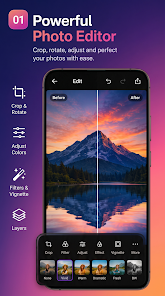
Photo crop and adjustment tools

02

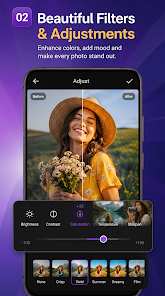
Filters and effects

03

Multi-photo collages

04

Carousel splitter

05

Text and sticker tools

06

Product and story templates

07

Batch editing

08

Local autosave

09

JPEG, PNG and WebP export

Quick answers

Frequently asked questions.

Does PostStudio need internet for editing?

The published app is designed so its core editing, collage and carousel tools work offline.